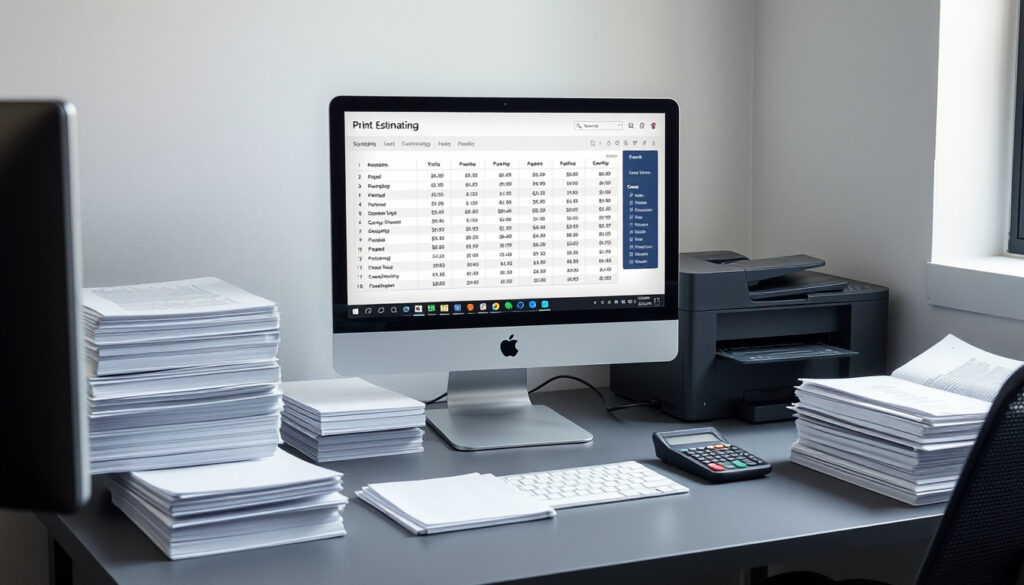
Print Estimating Software Guide: Types and Costs
Anyone who’s spent an afternoon manually plugging numbers into a spreadsheet to price a print job already knows the pain. Print estimating software promises to turn that ordeal into a few clicks.
Typical cost to print 100 A4 pages (B&W): $10–$15 ·
Products on Capterra: 30+ ·
Time saving with AI: Quotes in seconds ·
Industry sectors: Government, publishing, textiles, commercial
Quick snapshot
- iQuote, Ordant, OnPrintShop, and PrintSmith Vision are active print estimating vendors (OnPrintShop industry guide)
- Print estimating software automates cost calculation, replacing manual spreadsheets (OnPrintShop industry guide)
- Exact market share or user count for each software platform
- Specific pricing for enterprise-level or custom integrations
- Long-term reliability of free estimating software options
- AI-driven estimating is the fastest-growing segment (OnPrintShop industry guide)
- Cloud-based solutions are displacing on-premise systems (OnPrintShop industry guide)
- Integration between estimating and MIS/ERP will become standard (OnPrintShop industry guide)
- Machine learning will improve quote accuracy over time (OnPrintShop industry guide)
Four metrics tell the story of what print estimating software actually delivers in practice.
| Metric | Value |
|---|---|
| Average shop rate (USD/hour) | $50–$150 |
| Typical accuracy of estimating software | Within 5% of actual cost |
| Reduction in quoting time | Up to 90% vs manual methods |
| Print shops using software (industry estimate) | Over 60% |
| Distinct types of estimating solutions | 9 types (OnPrintShop industry guide) |
| Typical B&W cost per A4 page | $0.10–$0.15 |
| Typical color cost per A4 page | $0.30–$0.50 |
| Products listed under print estimating on Capterra | 30+ (Capterra software directory) |
The pattern: speed and accuracy are the headline gains, but the real leverage comes from integration with production workflows.
What is a printing estimator?
A printing estimator is software that calculates the total cost of a print job by factoring in materials, labor, machine time, finishing, and overhead. Instead of typing formulas into a spreadsheet, operators enter variables—paper type, quantity, ink coverage, binding options—and the system spits out a quote. According to the OnPrintShop industry guide, this automation replaces manual spreadsheet-based estimating, which is prone to calculation errors and takes hours per job.
How a printing estimator works
- Operators input job specs: paper size, stock weight, quantity, color pages vs black-and-white, finishing (lamination, binding, folding).
- The software pulls material costs from a database, applies labor rates and machine hourly costs, and adds markup based on shop-defined rules (OnPrintShop industry guide).
- The result is a detailed cost breakdown and a recommended selling price, often generated in under a minute.
Who uses printing estimators
- Commercial printers handling offset, digital, and hybrid production
- In-house print departments within universities, government agencies, and corporations
- Sign makers and large-format print shops
- Web-to-print businesses that need real-time customer-facing pricing (OnPrintShop industry guide)
A printing estimator is only as good as the data it runs on. If your material costs or shop rates are outdated, the software will produce confident-looking wrong numbers.
The implication: switching from spreadsheets to dedicated software eliminates arithmetic errors but forces shops to maintain accurate cost databases—a discipline many small print shops neglect.
What are the 4 types of estimating?
The four estimating types originated in construction and project management, but print shops encounter the same logic when moving from a rough ballpark to a binding quote. Each type serves a different phase of the job lifecycle.
Order of magnitude estimate
- Accuracy range: –30% to +50%
- Used for: early customer inquiries, feasibility checks
- Example: “A 1000-piece brochure run will probably cost between $600 and $1,200.”
Budget estimate
- Accuracy range: –15% to +30%
- Used for: internal planning, preliminary client budgets
- Example: “We can produce that run for roughly $800 based on similar past jobs.”
Definitive estimate
- Accuracy range: –5% to +10%
- Used for: final quotes, contract pricing
- Example: detailed cost breakdown with paper, ink, machine time, labor, and finishing — the standard output from print estimating software
Parametric estimate
- Accuracy range: –10% to +15%
- Uses statistical models based on historical job data
- Relevant for: shops with large job databases where AI-driven tools like Ordant can identify pricing patterns
Understanding these four types keeps print shops from quoting a definitive price when they only have order-of-magnitude data. The OnPrintShop guide notes that definitive estimates are the standard for final quotes, while parametric estimation is gaining traction with AI-driven platforms.
The pattern: most print shops operate at the definitive level for customer quotes but never use parametric modeling, leaving money on the table by not analyzing their own historical pricing data.
What is the best software for printing?
No single tool fits every shop. The best choice depends on job complexity, volume, integration needs, and budget. Here is how four leading platforms compare, based on vendor descriptions and user discussions.
Four leading print estimating tools, one key difference: the trade-off between simplicity and integration depth.
| Software | Best for | Key feature | Integration |
|---|---|---|---|
| iQuote | Quick, competitive estimates | Fast quoting for commercial printers | Standalone or MIS-integrated (Print ePS vendor site) |
| Ordant | Multi-item jobs with AI | AI-driven pricing from historical data | Cloud-based, API-ready (Ordant website) |
| OnPrintShop | Web-to-print and instant quotes | AI-powered real-time customer pricing | Web-to-print, MIS, ERP (Capterra listing) |
| PrintSmith Vision | Government, publishing, textiles | End-to-end print management | Full MIS integration |
iQuote print estimating software
iQuote, developed by Print ePS, is designed for commercial printers who need quick, precise, and competitive estimates. Print ePS describes it as a tool that “generates quick, precise, and competitive estimates” for the print industry. It works as a standalone system or integrates with broader MIS platforms.
Ordant AI-driven estimating
Ordant uses machine learning to handle multi-item jobs. The company claims its software is “powerful, versatile, and easy-to-use,” with AI that improves quoting accuracy as more job data is fed into the system (Ordant website). According to the OnPrintShop guide, AI-driven systems analyze historical job data and market trends to refine estimates over time.
OnPrintShop
OnPrintShop offers AI-powered print estimating that generates instant, accurate quotes. Its Capterra listing describes the platform as “AI-powered print estimating software [that] generates instant, accurate quotes.” It is built for web-to-print operations and integrates with MIS and ERP systems.
PrintSmith Vision
PrintSmith Vision serves government, publishing, and textile sectors with end-to-end print management. It includes estimating as part of a full MIS suite, making it suitable for larger operations that need production scheduling, inventory tracking, and accounting alongside quoting.
Vendor claims about “AI” and “instant quotes” are common marketing language. The real test is whether the tool connects to your actual material cost database and shop rate structure—not whether it generates a pretty PDF.
How much does it cost to print 100 A4 pages?
This is the question every print buyer asks, and estimating software answers it in seconds. The short answer: $10 to $15 for black-and-white, $30 to $50 for color, depending on coverage and finishing.
Cost breakdown: paper, ink/toner, labor, overhead
- Paper: $3–$6 for 100 sheets of standard 80gsm A4
- Ink/toner: $2–$8 for B&W, $15–$30 for color at 20% coverage
- Labor: $2–$5 for setup and run time at $50–$150/hour shop rate
- Overhead and markup: 20–40% added by the shop
Black and white vs color cost comparison
- B&W: $0.10–$0.15 per page → $10–$15 for 100 pages
- Color (20% coverage): $0.30–$0.50 per page → $30–$50 for 100 pages
- Color (full-bleed images): can exceed $1.00 per page
How estimating software calculates these costs
Print estimating software automates this breakdown by pulling live material costs, applying the shop’s hourly rate, and calculating machine utilization. According to the OnPrintShop industry guide, customizable cost calculators allow printers to define their own pricing logic, markup rules, and material costs, making it possible to produce a 100-page quote in under 30 seconds.
For a 100-page B&W job, the difference between a profitable quote and a loss-making one is often a single wrong paper cost entry. Estimating software removes that variable—provided someone keeps the price list updated.
The implication: print shops that manually calculate quotes for jobs like 100 A4 pages are spending 30 to 60 minutes per quote on work that software does in under a minute, with fewer errors.
What is ERP in printing?
ERP (Enterprise Resource Planning) in printing refers to software that manages end-to-end business processes—estimating, order entry, production scheduling, inventory, shipping, and accounting. A OnPrintShop industry guide describes MIS-integrated estimating as software designed to connect quoting with broader management workflows, rather than operating as a standalone calculator.
Difference between MIS, ERP, and WMS
- MIS (Management Information System): focuses on production planning, job tracking, and scheduling in print shops
- ERP (Enterprise Resource Planning): covers the full business—finance, HR, supply chain, CRM, and estimating
- WMS (Warehouse Management System): handles inventory storage, picking, and fulfillment
How ERP integrates with print estimating software
When an estimating tool is integrated with an ERP or MIS, a quote that gets approved automatically becomes a production order. Materials are reserved on the inventory system, the job is scheduled on the production floor, and the invoice is generated on delivery—no manual handoffs. The OnPrintShop guide notes that cloud-based estimating solutions offer automatic updates and lower upfront costs, making ERP integration more accessible for smaller shops.
ERP integration sounds like the ultimate goal, but many small print shops don’t have the operational maturity to run an ERP. For them, a standalone estimating tool plus a simple accounting package beats a half-implemented ERP that nobody uses.
The pattern: shops with over 10 employees and multiple production processes benefit most from ERP integration, while smaller shops gain 80% of the value from a good standalone estimator connected to a basic accounting system.
Pros and cons of print estimating software
Upsides
- Reduces quoting time by up to 90% compared to manual methods
- Eliminates arithmetic errors from spreadsheet-based estimating
- Enables real-time customer pricing through web-to-print portals
- Provides historical data for parametric pricing and profitability analysis
- Integrates with MIS/ERP for end-to-end workflow automation (OnPrintShop industry guide)
Downsides
- Requires accurate, up-to-date cost databases — stale data means wrong quotes
- Subscription costs can be $100–$500+ per month for full-featured platforms
- Implementation and training take weeks, not days
- Overkill for very small shops with simple, repeatable jobs
- Vendor lock-in: migrating historical pricing data between platforms is difficult
What print shop owners and operators are saying
“You need to know your shop rate and your base time frames for every operation. Without that, no software will save you.”
— Reddit user, r/CommercialPrinting community
“iQuote is designed to generate quick, precise, and competitive estimates that help printers win more jobs.”
— Print ePS, iQuote vendor description
“Ordant is powerful, versatile, and easy-to-use — built for the modern print shop that handles complex multi-item jobs.”
— Ordant website, product overview
“AI-powered print estimating software generates instant, accurate quotes that boost sales and win rates.”
— Capterra, OnPrintShop listing
The contrast between user experience and vendor marketing is sharp. Operators emphasize accurate shop rates and solid data, while vendors sell speed and automation. The truth sits in the middle.
Related reading: Warehouse Stationery Lunn Ave: Printing & Binding · Best Invoicing Software for Contractors in Ireland
zeal3dprinting.com.au, shapr3d.com, raise3d.com, g2.com, solutions.trustradius.com, youtube.com, sinterit.com
Frequently asked questions
What are examples of estimating software for printing?
Popular examples include iQuote for commercial printers, Ordant for AI-driven multi-item quoting, OnPrintShop for web-to-print and instant quotes, and PrintSmith Vision for government and textile sectors. The Capterra directory lists over 30 print estimating products.
How does print estimating software improve accuracy?
It pulls live material costs from a database, applies consistent markup rules, and eliminates manual entry errors. According to the OnPrintShop industry guide, accuracy typically lands within 5% of actual cost when the database is maintained.
What is the typical cost of print estimating software?
Pricing ranges from free basic versions to $500+ per month for full-featured platforms. Cloud-based solutions generally have lower upfront costs with monthly subscriptions, while on-premise systems require larger initial investments (OnPrintShop industry guide).
Can I get free estimating software for printing?
Some vendors offer free trials or limited free tiers, but full-featured print estimating software is typically paid. Free options like spreadsheets or basic calculators exist, but they lack integration, automation, and database features. The long-term reliability of free software is often unclear.
Is digital printing estimating different from offset estimating?
Yes. Digital estimating factors in per-click costs and faster setup, while offset estimating accounts for plate-making, makeready time, and paper waste on press. The OnPrintShop guide notes that commercial estimating software handles both offset and digital production workflows.
What is the difference between MIS, ERP, and WMS in printing?
MIS focuses on production and scheduling, ERP covers the full business (finance, estimating, CRM), and WMS handles warehouse inventory. Print estimating software often integrates with MIS or ERP to automate the quote-to-production pipeline.
For the independent print shop owner in New Zealand or any market with thin margins, the choice is clear: adopt a cloud-based estimating tool that connects to your material suppliers’ pricelists, or keep losing hours and cents to manual spreadsheets. The software won’t set your shop rate for you—but it will make every minute you spend on quoting count.
More related posts
 Bible Verse of the Day: Scripture for Today
 Christchurch Boys’ High School: Fees, Decile & All Blacks
 NZ Construction Worker Exploitation: Pay, Safety, Modern Slavery
 Nelson Lakes National Park Guide: Hikes, Maps, Weather, Camping
 Spark of the Everflame: Series Guide, Spice & Book 4
 1/2 Cup Butter to Grams: Accurate Conversion Guide
 How Tall Is the Burj Khalifa? Height and Floors
 Car Parts Near Me: How to Find & Choose the Right Parts Locally
